Making a guest list online is quick: pick a tool that collects names, share a link, and let people add themselves. For a birthday or a one-off party, that's genuinely all you need. The trouble starts when a venue runs that same shared form for a Saturday night — because a form that collects names does nothing at the door, captures no data worth marketing to, and falls apart the moment the list gets long. Here's how to build one properly, and how to tell when you've outgrown the form.
The five-minute version
For a personal event, any of these makes a guest list online in a few steps:
- Choose the collector. A shared spreadsheet, a form builder, or an RSVP app. All three do the same core job — hold names in one place people can add to.
- Decide the fields. At minimum, name and a plus-one count. Add email or phone if you actually plan to message people.
- Set who can edit. Give trusted people edit access; give everyone else a form so they can add themselves without seeing the whole list.
- Share one link. One source of truth. The fastest way to break a guest list is to have two versions of it circulating.
- Check it at the door. For a small event, someone scrolls the list and ticks names off.
That's a working online guest list. For most people, stop here.
If you want to join a Bali nightlife list rather than build one, Guest List Now is the guest-facing route for venue reviews and guest-list bookings.
Where a venue outgrows the form
A beach club or nightclub is a different problem. The same "make a list online" approach breaks in four predictable ways:
- The door is slow. A host scrolling a phone against a queue is the bottleneck, not the list. Names get missed, duplicates sneak in, and a prepaid table sits empty because nobody at the door can see it.
- The data is thin. A form captures the person who filled it in. The other seven people at their table — who came, drank, and might come back — never enter the database.
- It doesn't tie to revenue. A name on a form isn't linked to a booking, a spend, or a return visit. It's an attendance sheet, not an asset.
- It doesn't survive scale. Five promoters running five lists means five sources to reconcile at 11:40pm, under pressure, with a line out front.
At that point the question stops being "how do I make a guest list online" and becomes "what should the guest list do once it's online." The answer is: run the door and build the database at the same time.
What a venue-grade guest list adds
A proper guest list management system keeps the simplicity of a shared list and adds the parts a form can't:
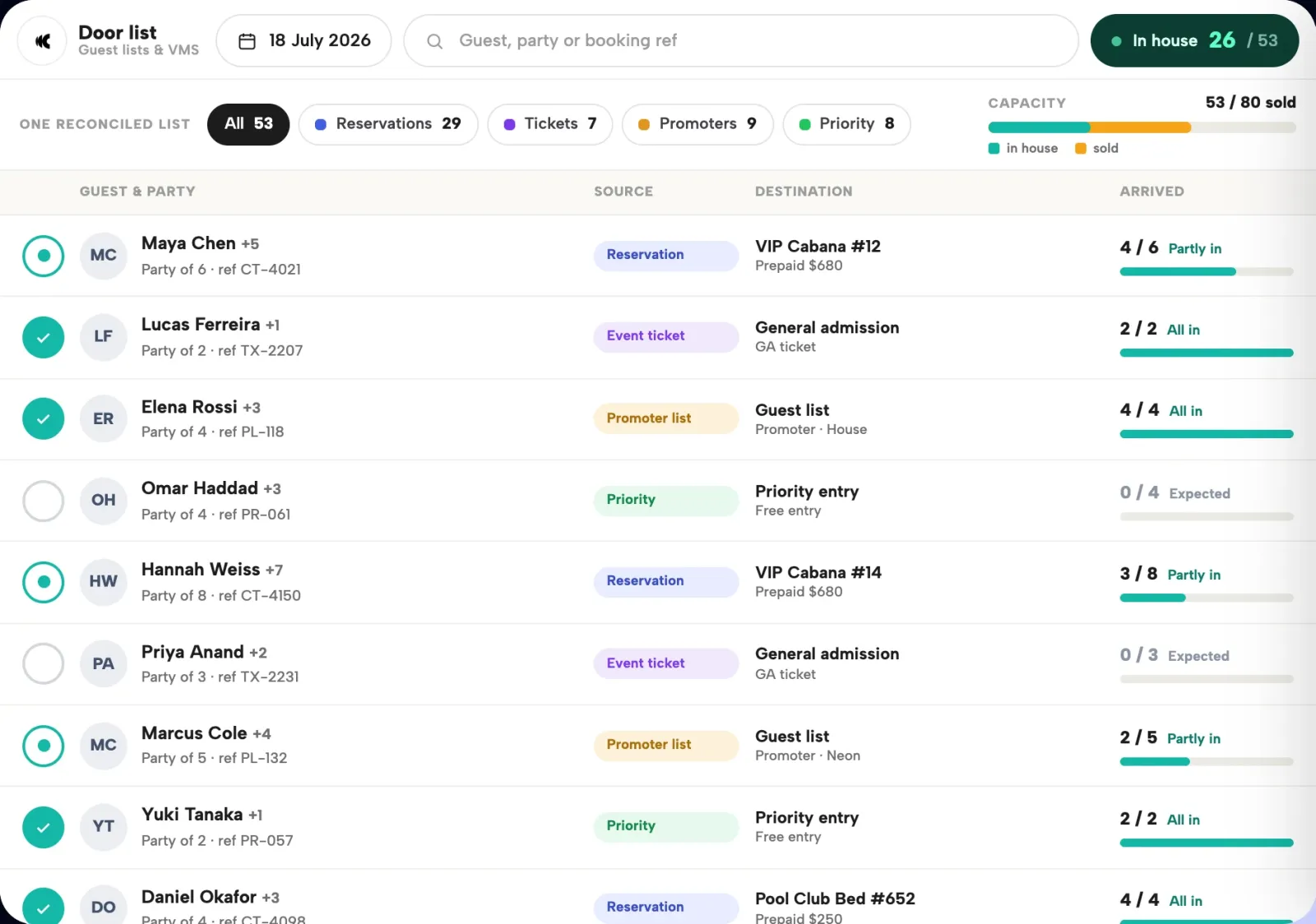
- One live list at the door. Reservations, tickets, priority registrations, and promoter names arrive in the same system, so the host works from a single source instead of five phones.
- QR check-in. Guests are checked in with a tap, not a name-hunt — fast even when the queue builds.
- Every guest, not just the booker. The booker invites their group and each guest supplies their own details, so a table of eight produces eight marketable records instead of one.
- Sold-out capture. When there's nothing left to book, priority and free-entry registration keeps taking details, so demand you can't seat still becomes contact you can market to.
On Clubtech that list lives inside the booking platform, so the door and the database are never out of sync, and the venue owns the guest data under its own brand. If you're weighing a simple form against something that runs the night, the online guest list vs RSVP tools breakdown draws the line clearly.
Questions operators ask
How do I make a guest list online for free?
Use a shared spreadsheet or a free form builder: create the sheet, decide your fields (name, plus-ones, and a contact field if you'll message people), set edit permissions, and share one link. That's enough for a personal event. For a venue, a free form won't check guests in at the door or capture the whole party, which is where a dedicated guest list system earns its place.
What's the difference between an online guest list and an RSVP tool?
An online guest list controls who gets in and is checked at the door; an RSVP tool mainly counts who's coming. For a party the two overlap. For a venue they diverge fast — a venue needs door check-in, every-guest data capture, and a link between the guest and their booking, which generic RSVP tools don't provide.
How does a venue check a guest list at the door?
A small event checks names off a scrolled list by hand. A venue-grade system checks guests in with a QR-code tap against one live list that combines reservations, tickets, and promoter names, so the door stays fast and duplicates and missed names disappear.
Can an online guest list capture data for a whole group?
A basic form captures whoever fills it in — usually one person per group. A proper guest list system lets the booker invite their group so each guest supplies their own details, turning a table of eight into eight records the venue can market to.
When should a venue move off a shared form?
When the list is running the door on a busy night. The signs are a slow queue, promoters running separate lists, guest data you can't market to, and no link between a name and a booking. At that point a form is costing you data and speed, and a guest list platform pays for itself.
See it on your floor plan. Continue to the guest-list solution, then book a demo.