The Clubtech platform now takes restaurant reservations. The Restaurant Module gives a restaurant full time-slot reservation booking, and it runs two ways: standalone, for a restaurant on its own, or integrated, for the restaurant inside a beach club, day club, nightclub, rooftop or hotel pool that already sells through Clubtech. The guest picks a date, a party size and an available time, adds extras, leaves their requests and pays, on your domain and under your brand. The screens are on the Restaurant Module page, and the film above follows a booking from the guest's phone to the floor plan.
Proven at the club. Ready for every venue.
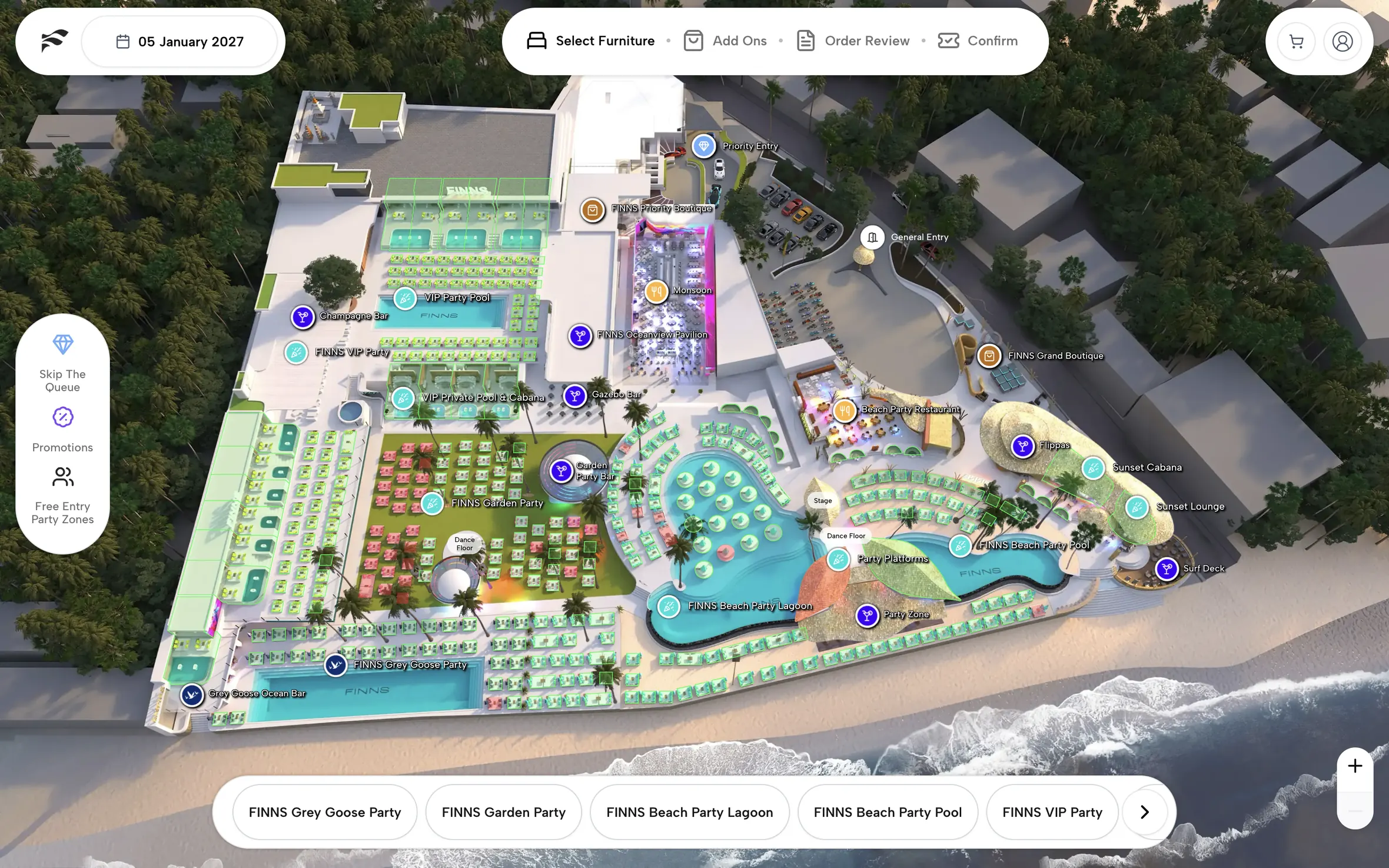
The booking platform was proven at the club, where it sells the daybed, the cabana and the VIP table before the guest arrives. FINNS Beach Club sold out nearly every day in peak season on it, and platform-wide it processes $1M USD in weekly GMV for venue partners in over 7 countries. Restaurants now get the same platform and the same white-label booking journey, whether they stand on their own or sit inside a venue.
Two ways to run it
Standalone: a restaurant on its own
A restaurant with no beach club or nightclub around it runs its reservations on the Restaurant Module by itself. The booking page sits on the restaurant's domain and in its design, and the guest details land with the restaurant, not with a marketplace or a third-party booking brand.
Integrated: the restaurant inside your venue
For beach club restaurant reservations, and for the dining room inside a day club, nightclub, rooftop or hotel pool, the restaurant joins the platform the venue already sells its furniture through. A dining terrace has its own service times, party sizes and guest requests, and it often runs on a separate diary from the furniture. A covers diary and a furniture platform model inventory differently, and a venue running both ends up with two booking surfaces.
Integrated, guests reserve the 7pm table for four the way they already reserve the front-row daybed: on your site, in your design, with the guest details landing with you. One venue, one platform.
What the Restaurant Module page shows
The Restaurant Module page walks the guest flow screen by screen: discovering the restaurant, choosing the date and time, adding extras, leaving requests, and the payment step, each shown as a still from the restaurant booking widget. Then it turns to the team's side: the floor plan the service runs from and the guest profile that opens with each booking. Short copy sits with each screen. If you want to see the flow before reading about it, start there.
The guest journey, step by step
Here is what the guest sees in the restaurant booking widget, standalone or integrated.
Discover the restaurant
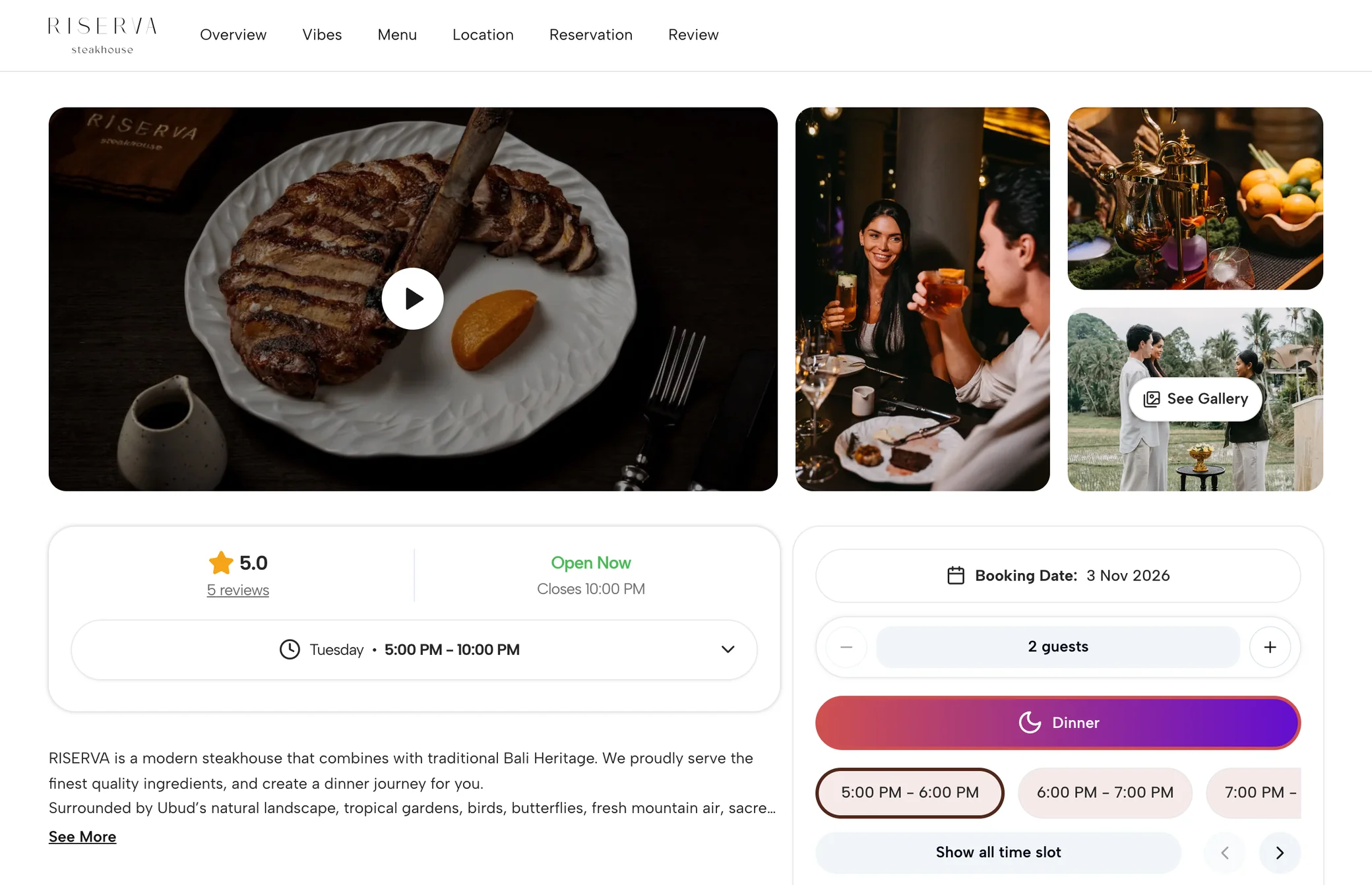
The booking page opens on the restaurant. Photography and a gallery video sit at the top, with the opening hours, a short description and menu highlights beneath them. The guest gets a feel for the room before they are asked for anything.
Choose the date, the party and the time
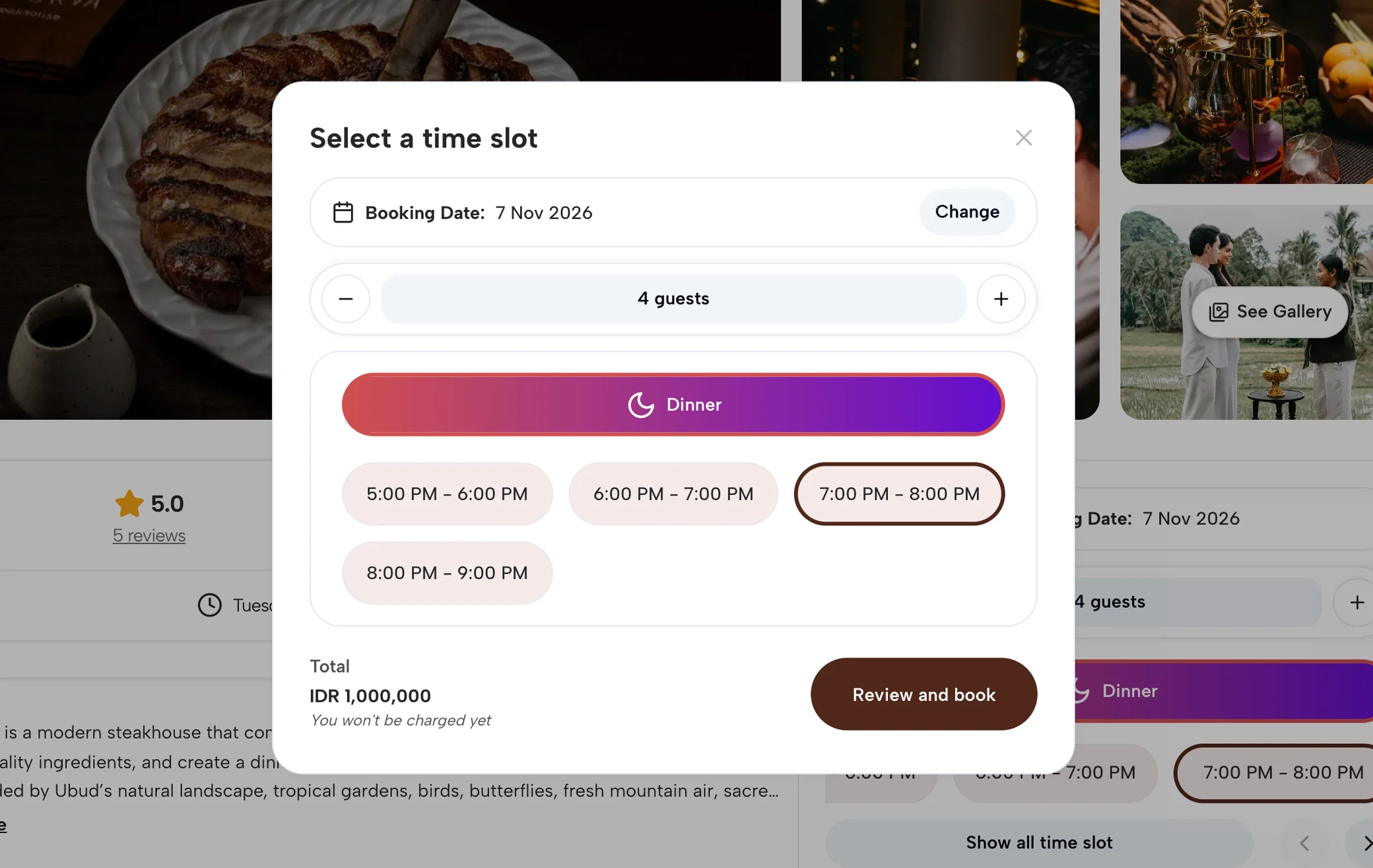
A reservation panel sits beside the gallery on desktop and slides up on a phone. The guest sets the booking date, steps the party size up or down, and picks from the available slots for that service. In the preview it is dinner, with hour-long slots from 5pm through to the 8pm table. The reservation amount is shown before the guest continues, and the page says plainly that nothing is charged yet.
Add something before arrival
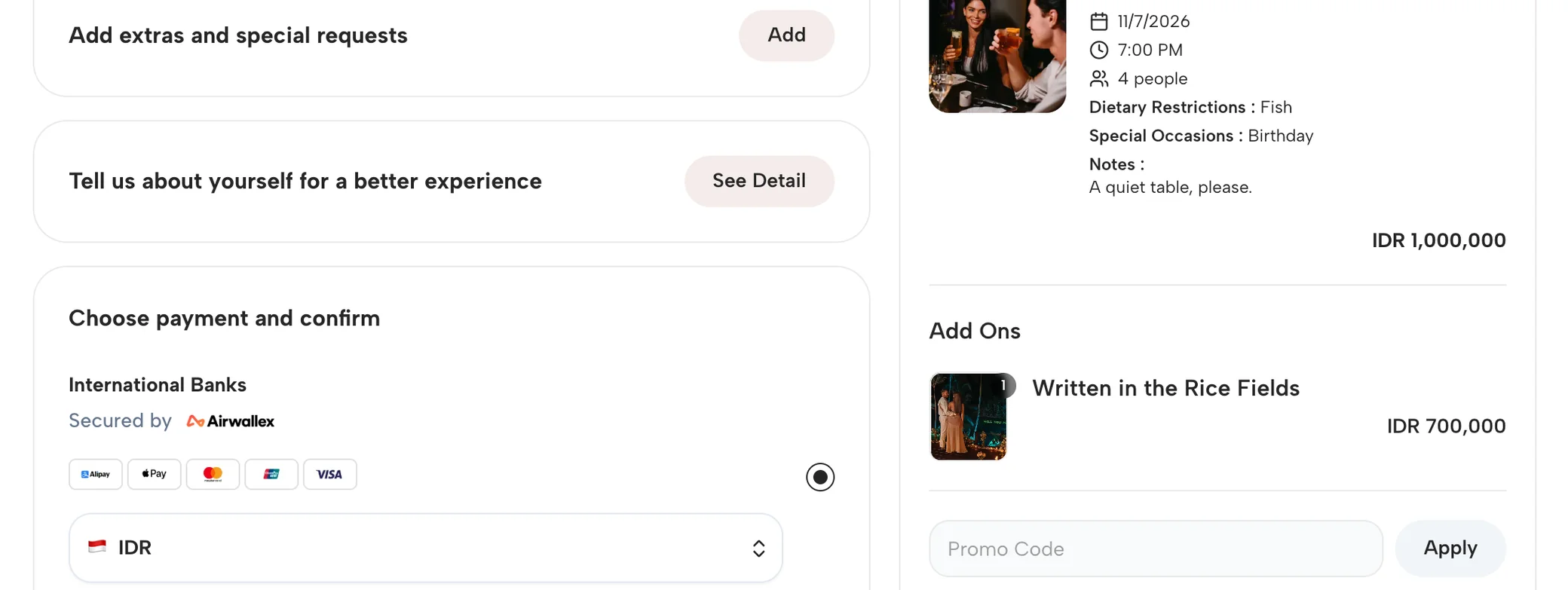
Review and book opens checkout, and the first thing in it is the restaurant's extras. The reservation summary carries the restaurant, the date, the time and the guest count into the order, and optional experiences sit beneath it with an add button each. The extra is offered while the guest is already planning the evening.
Make the reservation personal
Guest details come next: first name, last name, email and phone, then a special request section with three controls, dietary restrictions, special occasions and notes. What the kitchen and the floor want to know before the party walks in is collected on the booking, not on the night.
Choose payment and confirm
Checkout ends at the payment step, Choose payment and confirm, inside Review and pay. The amount was shown before the guest continued, and the slot is held while they complete it.
Time slots, guest counts, extras and payment setup are worked through with your team at onboarding. Hour-long dinner slots are one shape; the module is set up around how your restaurant serves.
After the booking: the floor and the guest
Payment is where the guest's part ends. The reservation then lands in the Clubtech dashboard, where the team runs the service.
Every reservation on the floor plan
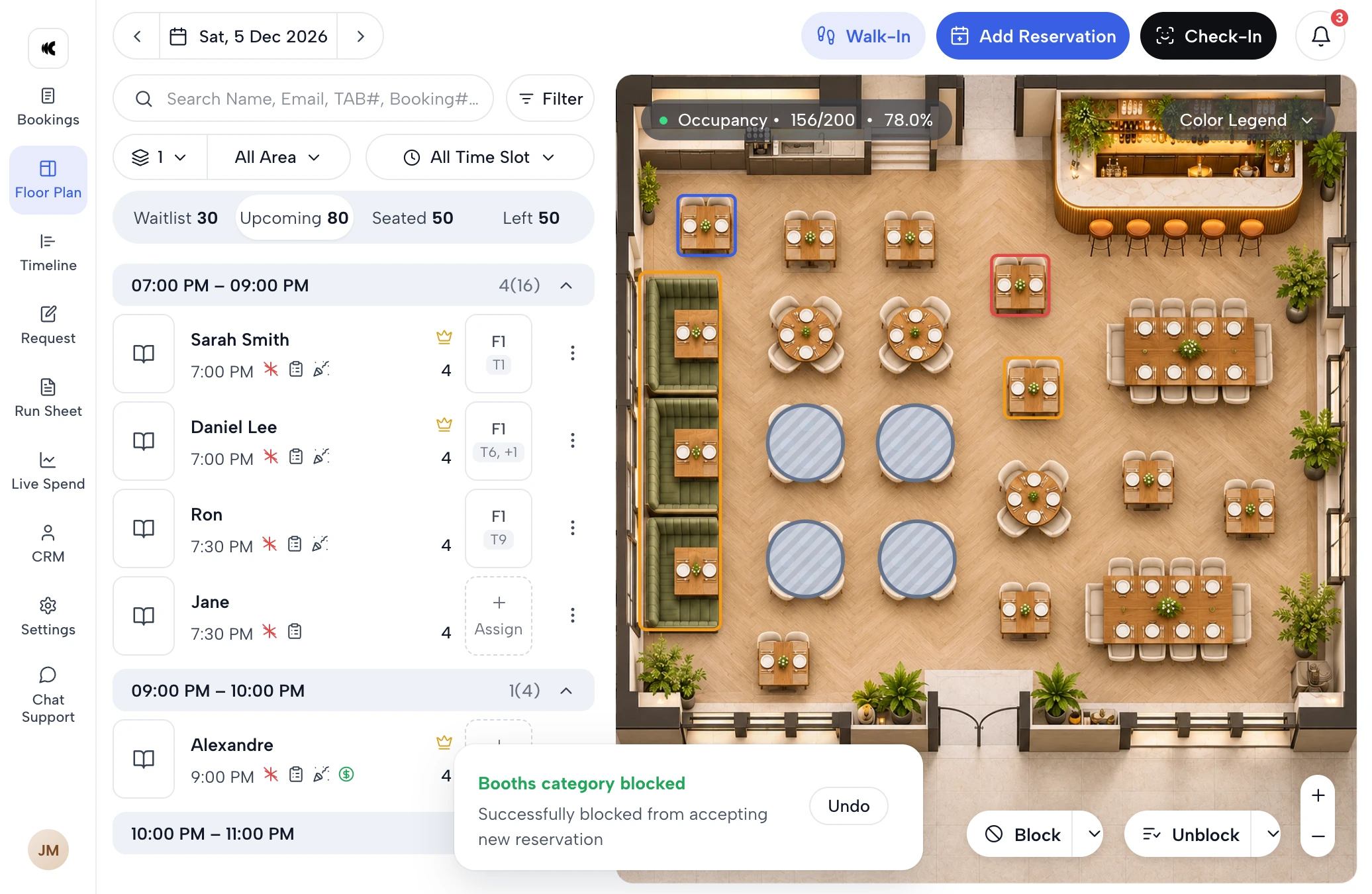
Online bookings land on the floor plan as they happen, grouped by time slot. The host seats each party at a table from the map, or lets allocation do it, takes manual bookings beside the online ones, and can block an area or a whole day from new reservations. Guests are checked in at the door from the same screen. By the time doors open, the team knows what is booked and where.
The guest, open with the booking
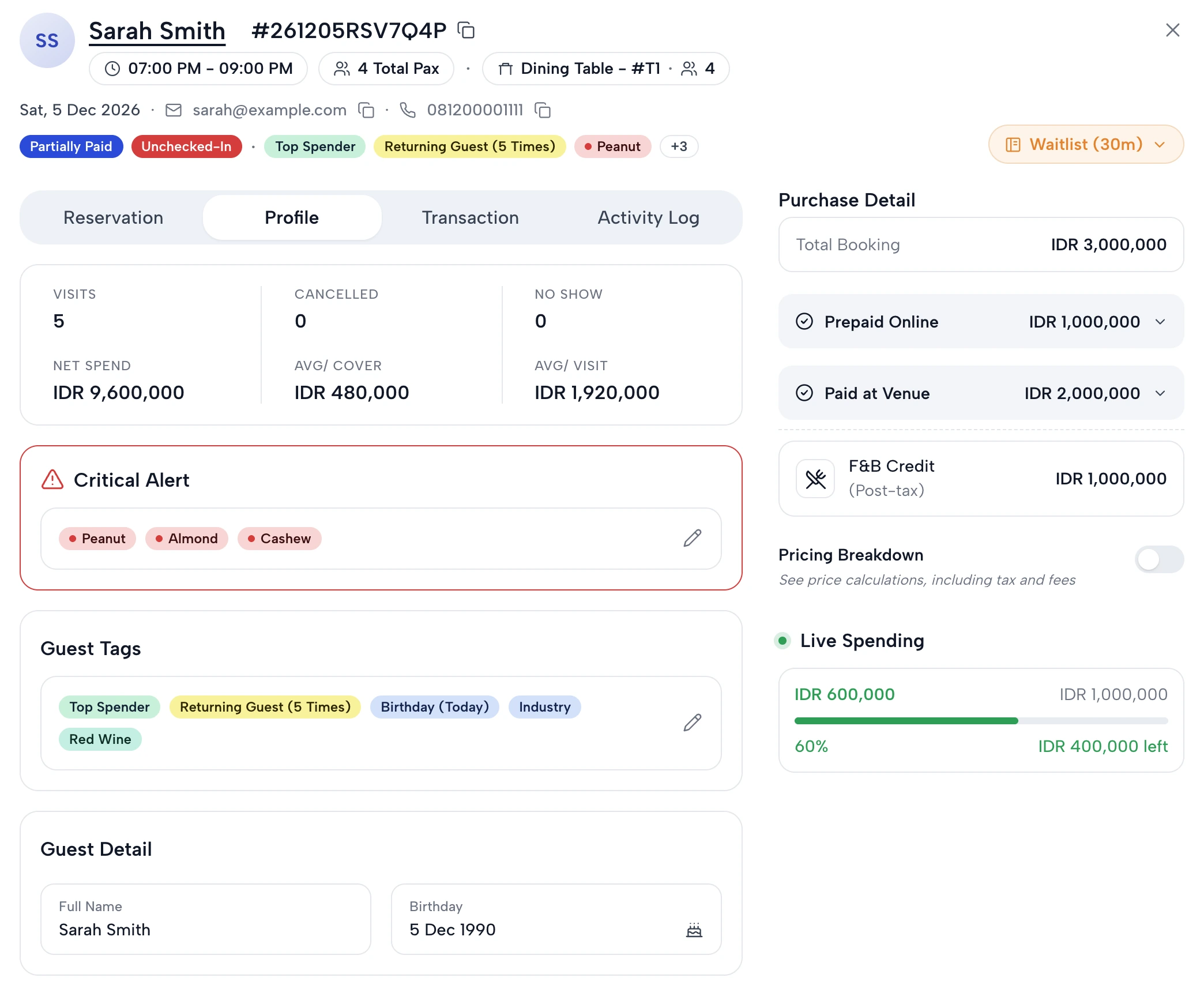
Open a reservation and the guest comes with it. The dietary requirements from checkout show as a critical alert, the birthday as a tag, and the profile keeps the guest's visits, cancellations and no-shows. With the POS connected, online and in-venue spend sit together, so the floor can see tonight's spend against the guest's credit.
How it fits the rest of Clubtech
Standalone, the Restaurant Module is the restaurant's booking: the page, the time-slot flow, the extras, the requests and the payment step. Integrated, it sits beside everything else the venue runs on Clubtech, as an add-on to the platform, and the restaurant's tables share one floor plan and one dashboard with the daybeds and the VIP tables. The 3D birds-eye booking map where guests pick the exact daybed or table, the packages and add-ons, the reporting and the marketing loop are all part of the wider platform. The proof points above are club and platform results, and restaurants now book on the same system.
Questions operators ask
What is the Clubtech Restaurant Module?
The Restaurant Module gives a restaurant full time-slot reservation booking on the Clubtech platform. It runs standalone for a restaurant on its own, or integrated with a venue's furniture and ticket booking. Guests choose a date, party size and available time slot, add optional extras, share dietary requirements, occasions and notes, and pay, all under the restaurant's own brand and on its own domain.
Can a standalone restaurant use Clubtech?
Yes. A restaurant on its own can take its reservations on the Restaurant Module: time slots, party sizes, extras, guest requests and payment, on its own domain and under its own brand. A restaurant inside a beach club, day club, nightclub, rooftop or hotel pool can run the same module integrated with the venue's furniture and ticket booking instead.
Is the Restaurant Module part of the core platform?
For a venue already on Clubtech it is an add-on, configured alongside the venue's furniture booking. A standalone restaurant runs it on its own. Either way, time slots, guest counts, extras and the payment setup are worked through with your team, and we confirm the configuration and scope during a demo.
Do guests pick a table on a map in the restaurant flow?
No. The restaurant journey is a date, a party size and an available time slot, which is how a dinner service is sold, and the team seats the party from the floor plan afterwards. Choosing a specific table, daybed, cabana or zone on the 3D booking map is Clubtech's furniture journey, and in an integrated venue it runs alongside the restaurant flow on the same platform.
Does the reservation run under the restaurant's own brand?
Yes. Clubtech is white-label. The booking page carries your header, design and domain from the first screen to the payment step, and the guest data captured with the reservation belongs to you. The guest is never handed to a marketplace or a third-party booking brand.
What can guests add to a restaurant reservation?
Optional extras are offered inside checkout, with the restaurant, date, time and guest count already carried into the order, and each experience is added with one tap. The guest-details step then collects dietary restrictions, special occasions and notes alongside the booker's name, email and phone, so the requests arrive with the booking.
Bring your restaurant's service times to the call. See every screen first on the Restaurant Module page, then we will show the restaurant flow configured for a restaurant like yours, on its own or next to the map your venue already sells from. Book a demo